From router-based connectivity to firewall-enforced segmentation and cross-platform security monitoring. A hands-on virtual environment built to explore how infrastructure and defensive security work together.
Build a realistic segmented network and explore controlled service access between internal hosts, a DMZ and external connectivity. Add logging and endpoint monitoring to make network behaviour observable. The lab has evolved beyond its original three-zone design; the current export includes an additional internal network and specific DMZ-to-monitoring exceptions.
WATCH THE LAB WALKTHROUGH
A 36-second tour of the GNS3 topology, Cisco ASA and switch configuration, Kali Linux, Windows 11 and Wazuh.
Silent video with on-screen explanations. The recording shows a later configuration, including Windows on 10.30.0.0/24, and a Wazuh snapshot with two disconnected agents and no active agents.Download video · MP4
HOW THE LAB EVOLVED
01 / FOUNDATION
Routing & switching
Rebuilt the Layer 2/Layer 3 topology using Cisco IOSvL2 and a virtual router. Separated WAN and LAN domains, configured VLANs and access ports, and structured the uplink to R1. The router obtained its upstream address through DHCP and provided DHCP and NAT internally.
02 / VISIBILITY
Cross-platform monitoring
Deployed Wazuh on Ubuntu and enrolled Windows 11 and Kali Linux agents. Log and alert collection added endpoint visibility and created a platform for exploring file integrity monitoring, vulnerability detection and event correlation.
03 / SECURITY BOUNDARIES
Router to Cisco ASA
Progressed from the router to an ASA 8.4 firewall. Introduced Inside, DMZ and Outside zones, then an additional Inside30 network. Configured ACLs, outbound NAT, DHCP and syslog forwarding. The current configuration is documented below.
THE CURRENT ASA NETWORKS
01 / INSIDE
Internal & management network
192.168.10.0/24 · level 100
Includes the monitoring host at 192.168.10.12 and the ASA DHCP pool. The attached Inside ACL permits all IP traffic.
02 / DMZ
Isolated service network
192.168.20.0/24 · level 50
Permits TCP 1514 and 1515 to the Inside monitoring host while denying HTTPS to that host.
03 / INSIDE30
Additional internal network
10.30.0.0/24 · level 90
Permits TCP 1514, 1515 and HTTPS to the monitoring host. Windows 11 uses this network in the recording.
04 / OUTSIDE
External connectivity
DHCP uplink · level 0
The export includes outbound NAT and a default route. OUTSIDE-IN is defined but not attached.
THE DEPLOYED TOPOLOGY
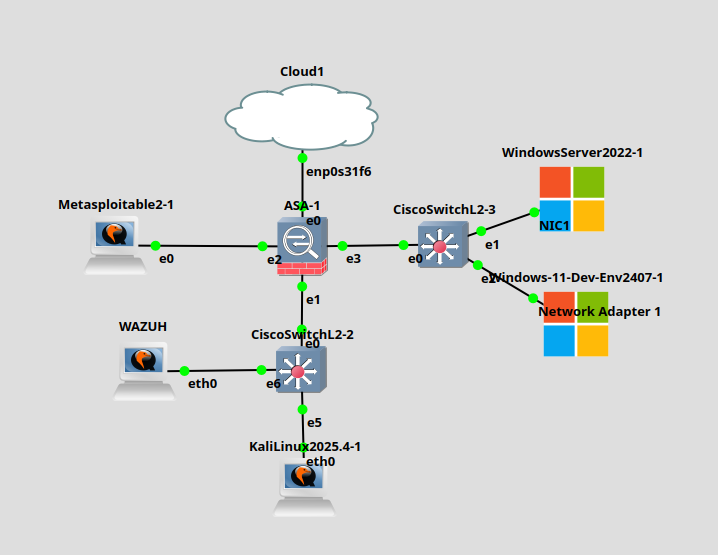
Updated GNS3 topology screenshot from the ASA stage, showing green link indicators. The supplied configuration documents the networks above; the screenshot does not label interface-to-zone assignments.
CISCO ASA CONFIGURATION
Selected extracts from my ASA 8.4(2) running configuration. Credentials have been removed from the downloadable export, and the upstream gateway has been replaced with a documentation address. Private lab addresses are retained.
Interfaces & security levels
The snapshot separates Outside (0), Inside (100), DMZ (50) and Inside30 (90). Outside obtains its address through DHCP.
The attached DMZ ACL permits TCP 1514 and 1515 to 192.168.10.12 and explicitly denies HTTPS to that host. This is a deliberate exception to DMZ isolation.
Each internal network has dynamic interface NAT configured toward Outside. NAT rules alone do not establish that traffic is permitted by the attached ACLs.
The ASA forwards informational syslog to the Inside host and provides an Inside DHCP pool. This export does not include logging buffered or explicit per-entry ACL log options.
Snapshot notes: INSIDE-OUT is attached inbound on Inside and permits all IP traffic. INSIDE-IN and OUTSIDE-IN are defined but not attached in this export. Configuration shows intended policy; runtime behaviour and complete event collection require test evidence.
Configured service-specific ACLs for DMZ and Inside30 access to the monitoring host, plus a broad Inside permit rule. Added outbound NAT for all three internal networks and informational syslog forwarding.
Network services
Used Layer 2 switching for VLAN segmentation and access port control. Moved routing and DHCP services to the ASA and assigned a static address to the DMZ host.
Boundary testing
Tested segmentation boundaries, validated firewall behaviour and analysed logged events while simulating internal access to DMZ-hosted services.
Endpoint visibility
Integrated Windows and Linux agents with the Ubuntu Wazuh server to collect endpoint logs, alerts and behavioural data alongside the network lab.
This case study describes my implementation and testing. The configuration export and walkthrough show the recorded setup; captured segmentation test results are not yet included.
WHAT I DEVELOPED
The progression reinforced network design, VLAN configuration, DHCP/NAT troubleshooting, firewall policy creation and cross-platform monitoring. Moving from basic connectivity to explicit security boundaries helped connect infrastructure operation with defensive security practice.